 Shipped by Prompt
Netlify's plans now run on credits. The Free plan gives you 300 credits a month with a hard limit; when they run out, Netlify pauses the projects on the account until the next month. Whether 300 is plenty or nowhere near enough depends less on your visitors than you might expect, and more on how often you deploy.
All prices and rates below were checked on 31 October 2026 on Netlify's pricing page and billing docs.
What spends credits
| Usage | Credits | In plain terms |
|---|---|---|
| Production deploy | 15 per successful deploy | Each time a new version goes live |
| Bandwidth | 20 per GB | The files your visitors download |
| Web requests | 2 per 10,000 requests | Each file or page a browser asks for |
| Function compute | 10 per GB-hour | Server-side code such as a function that hides an API key |
| Form submissions | Free | Unlimited on credit-based plans |
The plans, for reference:
| Plan | Price | Notes |
|---|---|---|
| Free | $0 | 300 credits a month, hard limit, 1 team owner, 1 build at a time |
| Personal | $9 a month | One person, more credits |
| Pro | $20 a month | Unlimited members, larger credit tiers available |
Check Netlify's pricing page for the exact credit allowance of Personal and Pro before you upgrade; the tiers are set there and can change.
The number that surprises people: deploys
For a typical AI-built app, deploys are the biggest line, not traffic.
300 credits divided by 15 per deploy is 20 production deploys a month, if nothing else used credits. A builder like Lovable pushes to GitHub after each change you accept. If the repository's main branch is connected to Netlify, every one of those pushes becomes a production deploy. An afternoon of twenty small prompt tweaks can use the whole month.
Three worked examples
These use round numbers to show the shape of the bill, not to predict yours exactly. A first visit to a Vite app downloads around 1 MB of files spread over about ten requests; your app may be lighter or heavier, and you can see the real figures in the browser's developer tools under the Network tab.
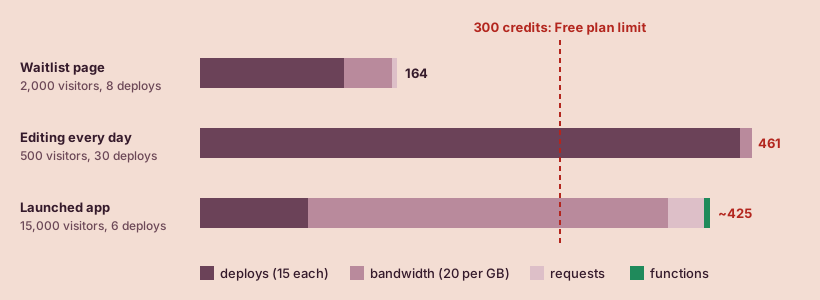
1. A waitlist page before launch
- 2,000 visitors in the month, about 1 MB and 10 requests each.
- 8 production deploys while you polish the page.
- A Netlify Forms waitlist.
| Item | Calculation | Credits |
|---|---|---|
| Deploys | 8 × 15 | 120 |
| Bandwidth | 2 GB × 20 | 40 |
| Requests | 20,000 ÷ 10,000 × 2 | 4 |
| Form submissions | free | 0 |
| Total | 164 of 300 |
Comfortably on the Free plan.
2. An app you are still editing every day
- 500 visitors, mostly you and testers: about 0.5 GB and 5,000 requests.
- 30 production deploys, because every builder change goes straight to main.
| Item | Calculation | Credits |
|---|---|---|
| Deploys | 30 × 15 | 450 |
| Bandwidth | 0.5 GB × 20 | 10 |
| Requests | 5,000 ÷ 10,000 × 2 | 1 |
| Total | 461 of 300 |
Over the limit with almost no traffic. The fix costs nothing; see "Spend fewer credits on deploys" below.
3. A launched app with steady traffic
- 15,000 visitors a month at about 1 MB and 10 requests each: 15 GB and 150,000 requests.
- 6 production deploys.
- An AI feature behind a function, using a little compute.
| Item | Calculation | Credits |
|---|---|---|
| Deploys | 6 × 15 | 90 |
| Bandwidth | 15 GB × 20 | 300 |
| Requests | 150,000 ÷ 10,000 × 2 | 30 |
| Compute | small | ~5 |
| Total | ~425 of 300 |
Here the traffic itself is beyond the Free plan. This is the point where a paid plan makes sense, because the alternative is the app going offline for real users near the end of the month.
Spend fewer credits on deploys
- Edit on a branch, publish on main. Ask the builder to work on a separate branch, or turn off automatic sync while you experiment. Netlify builds branch and pull-request changes as previews with their own address. The 15-credit charge in Netlify's docs is for production deploys, so batching a day of edits into one merge to main costs one production deploy instead of twenty.
- Merge once a day, not once a prompt. Visitors rarely notice the difference between a fix going live at 3 pm or 6 pm.
- Shrink what visitors download. Large images are the usual cause of high bandwidth. Compressing a 3 MB hero image to 300 KB cuts that image's bandwidth by 90%.
What happens at the limit
On the Free plan the limit is hard. When the month's credits are used up, Netlify pauses all projects on the account. Visitors see a "Site not available" page, and paused sites stop receiving new requests and form submissions. People on the Netlify forum report exactly this message: "This site was paused as it reached its usage limits."
To get back online straight away you can upgrade or add credits. Otherwise the projects come back when the next monthly cycle starts.
Two consequences worth planning for:
- One busy project pauses the others. The limit is per account, so a side project's traffic spike can take your main app offline. Keep the app real users depend on in its own account or team if your other projects are unpredictable.
- Launch days are spiky. A post that does well can bring a month of visitors in a day. If you are about to announce, check usage first.
When to move to Personal or Pro
- Stay on Free while the app is a prototype or waitlist and you control the deploy count.
- Move to Personal ($9 a month) when your own app has steady real users and a pause would cost you something: sign-ups, sales or trust.
- Move to Pro ($20 a month) when more than one person needs access to the project, such as a co-founder or a freelancer, or when you need the larger credit tiers.
You can see your current usage in the Netlify dashboard. Check it a week after launch, multiply by four, and compare with 300.
Not on Netlify yet? Start with Where to host an app you built with AI.
Sources, checked by hand
- Netlify pricing2026-10-31
- Netlify: Credit-based pricing plans2026-10-31
- Netlify: How credits work2026-10-31
- Netlify: Billing FAQ for credit-based plans2026-10-31
- Netlify forum: Site paused as it reached its usage limits2026-10-31
- Netlify: Deploy Previews2026-10-31