 Shipped by Prompt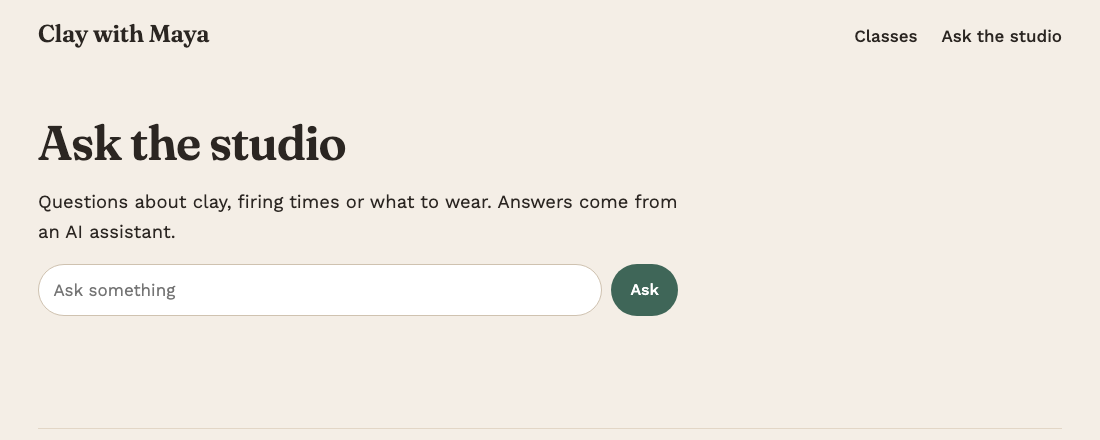
AI builders are good at making a feature work and bad at telling you what it exposed along the way. The classic case: you ask for "a chat feature using OpenAI", paste your key when asked, and the builder puts the key in the app's frontend code. The feature works. The key is also now in a file that every visitor's browser downloads.
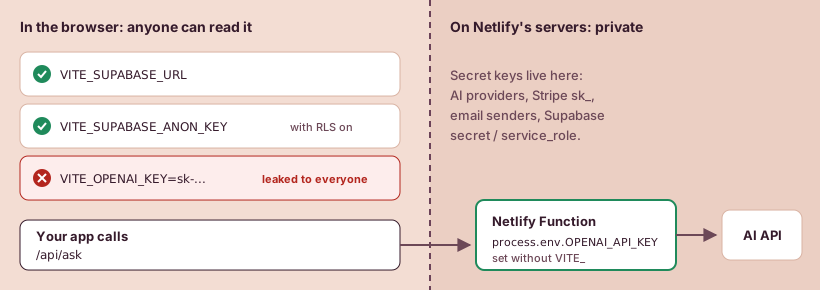
This guide sorts keys into the ones that can live in the browser and the ones that cannot, and shows how to move the second kind into a Netlify Function.
Why frontend code cannot keep a secret
Everything in a Lovable or Bolt app's frontend is sent to the visitor's browser: the HTML, the styles and all the JavaScript. Anyone can open the browser's developer tools and read it. Minifying the code does not hide strings like keys.
Vite, which Lovable and Bolt use, makes this explicit. Its docs say variables prefixed with VITE_ are exposed in client-side source code. That is the purpose of the prefix: it marks values that are meant to be public. Netlify's docs say the same about framework builds in general: do not copy sensitive values into your build, because anyone can access them there.
So the rule is simple. If a key is named VITE_something, assume the whole internet can read it. That is fine for some keys and a disaster for others.
Which keys are fine in the browser
| Key | Safe in the browser? | Why |
|---|---|---|
| Supabase project URL | Yes | It is just your project's address |
| Supabase publishable key (formerly "anon") | Yes, if Row Level Security is on | Supabase's docs say anyone can read it, so it only reaches what Row Level Security allows |
| Supabase secret key (formerly "service_role") | Never | It bypasses every Row Level Security policy. Supabase says never to put one in a browser |
| OpenAI, Anthropic or other AI model keys | Never | Anyone holding it can run up your bill |
Stripe publishable key (pk_...) |
Yes | Made for the browser |
Stripe secret key (sk_...) |
Never | It can issue refunds and read customer data |
| Email sending keys (Resend, SendGrid...) | Never | It lets anyone send email as you |
The Supabase row hides the most common gap in AI-built apps. A publishable key in the browser is normal. It is only safe when Row Level Security policies are switched on for your tables. Without them, the "public" key can read and change every row. Check the Supabase dashboard: each table should show RLS as enabled, with policies that match who should see what.
How to check your own app
- In the builder or on GitHub, search the code for
sk-,sk_,secret,service_roleand the names of the services you use. - Search for
VITE_and read the list of variable names. Anything secret in that list is exposed. - Open your live site, then the browser's developer tools, then the Sources or Network tab. Search the loaded JavaScript for the start of your key.
If you find a secret key, take it out of the code, rotate it at the provider so the old one stops working, and put the new one somewhere server-side. Rotating matters because the old key is already in deployed files and in your Git history.
Where the secret goes instead: a Netlify Function
A Netlify Function is a small piece of code that runs on Netlify's servers when it is called, not in the visitor's browser. Your frontend calls the function; the function adds the secret key and calls the real API; the visitor only ever sees the answer.
Netlify's docs recommend exactly this: use a function to access sensitive values at runtime.
1. Store the key in Netlify
In your project, go to Project configuration > Environment variables and add the key, for example OPENAI_API_KEY. Do not add the VITE_ prefix; without it, Vite will not put the value into the frontend files. You can set a different value per deploy context (production, deploy previews, branch deploys), which lets previews use a separate test key with a low spending limit.
2. Add the function
Create netlify/functions/ask.mjs in the repository:
export default async (request) => {
  // Only answer pages on this site.
  const origin = request.headers.get("origin");
  if (!origin || new URL(origin).host !== new URL(request.url).host) {
    return new Response("Not allowed", { status: 403 });
  }
  const { question } = await request.json();
  if (!question || question.length > 2000) {
    return new Response("Bad request", { status: 400 });
  }
  const res = await fetch("https://api.openai.com/v1/chat/completions", {
    method: "POST",
    headers: {
      "Authorization": `Bearer ${process.env.OPENAI_API_KEY}`,
      "Content-Type": "application/json",
    },
    body: JSON.stringify({
      model: "gpt-4o-mini",
      max_tokens: 400,
      messages: [{ role: "user", content: question }],
    }),
  });
  const data = await res.json();
  return Response.json({ answer: data.choices?.[0]?.message?.content ?? "" });
};

export const config = {
  path: "/api/ask",
  rateLimit: { windowLimit: 10, windowSize: 60, aggregateBy: ["ip", "domain"] },
};
The key is read with process.env inside the function, on the server. It never reaches the browser.
3. Call it from the app
const res = await fetch("/api/ask", {
  method: "POST",
  body: JSON.stringify({ question }),
});
const { answer } = await res.json();
You can give the builder a prompt such as: "Move the OpenAI call into a Netlify Function at netlify/functions/ask.mjs that reads OPENAI_API_KEY from process.env. Give it the path /api/ask and a rate limit of 10 calls a minute per visitor. The frontend should call /api/ask and must not contain the key." Then search the code again for the key to confirm it is gone.
Two limits to set while you are here
A function keeps the key private, but anyone can still call the function itself. The example above already has three protections; add the fourth at your provider:
- Same-site check. The Origin check stops other websites from calling your function from their visitors' browsers. Scripts can fake that header, so it is not enough alone.
- Rate limit. The
rateLimitblock makes Netlify refuse a visitor after 10 calls a minute. It works on every plan (the Free plan allows 2 such rules per project), and the deploy log shows whether the rule was applied. - Cap the input and the answer. The length check and
max_tokenskeep each call cheap. - Set a spending limit at the provider. Most AI providers let you set a monthly budget on the key. Use it.
A function with its own path runs before the /* /index.html 200 rewrite, so the single-page app rule does not swallow /api/ask.
Function time is billed in credits on Netlify's credit-based plans, 10 credits per GB-hour of compute (checked 31 October 2026). A short request that waits on an AI model uses very little, but a public endpoint called in a loop adds up. Is Netlify's free plan enough? shows how to estimate it.
Next
If the app still loses data or logins after you move keys around, the deploy errors page covers the "undefined" variable and Supabase key problems people report most on the Netlify forum.
Sources, checked by hand
- Vite: Env variables and modes2026-10-31
- Supabase: API keys2026-10-31
- Netlify: Use environment variables with frameworks2026-10-31
- Netlify: Environment variables, get started2026-10-31
- Netlify: Environment variables overview2026-10-31
- Netlify: Rate limiting2026-11-02
- Netlify: Request processing order2026-11-02
- Netlify: Functions environment variables2026-10-31
- Netlify: How credits work2026-10-31