 Shipped by Prompt
Ask an AI builder for "a waitlist form" and you get a nice-looking form that does nothing, or one wired to a database table you now have to look after. If the app is on Netlify, there is a simpler option: Netlify Forms collects the submissions for you, with no backend and no database. Submissions are free and unlimited on Netlify's credit-based plans (checked 31 October 2026).
There is one catch, and it is the reason most AI-built forms never show up in Netlify.
Why your form is not detected
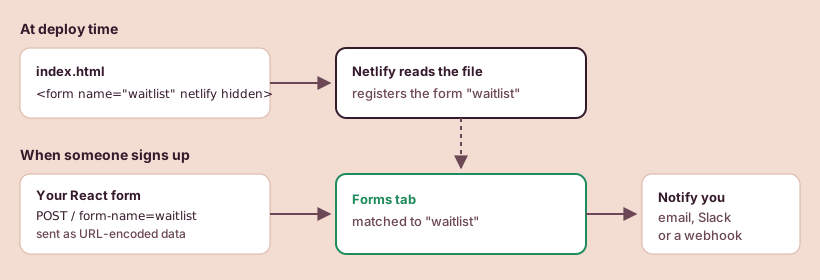
Netlify finds forms by reading your HTML files when the site is deployed. It looks for a <form> tag with a netlify or data-netlify="true" attribute, registers that form, and injects a hidden field called form-name so it knows which form a submission belongs to.
A Lovable or Bolt app is a React app. Its forms do not exist in the HTML files; JavaScript draws them in the browser after the page loads. When Netlify reads the files at deploy time, there is no form to find. Adding data-netlify="true" to the React component does nothing on its own.
Netlify's docs describe the fix for JavaScript-rendered forms in two parts:
- Put a plain HTML copy of the form in
index.html, so Netlify can detect it at deploy time. - Add a hidden input named
form-nameto the form your React code renders, so each submission says which form it belongs to.
Step 1: a hidden copy of the form in index.html
Open index.html at the root of the project and add this inside <body>, above the <div id="root">:
<form name="waitlist" netlify netlify-honeypot="bot-field" hidden>
  <input type="email" name="email" />
  <input name="bot-field" />
</form>
It is hidden, so visitors never see it. Its only job is to tell Netlify that a form called waitlist exists, with a field called email. Every field your real form sends must be listed here too, or Netlify drops it.
Step 2: send the real form to Netlify
In the React component, the form needs the same name in a hidden form-name field, and the submission has to be posted as URL-encoded form data. A minimal version:
function WaitlistForm() {
  const [status, setStatus] = React.useState("idle");

  async function handleSubmit(event) {
    event.preventDefault();
    const data = new FormData(event.target);
    const res = await fetch("/", {
      method: "POST",
      headers: { "Content-Type": "application/x-www-form-urlencoded" },
      body: new URLSearchParams(data).toString(),
    });
    setStatus(res.ok ? "done" : "error");
  }

  if (status === "done") return <p>You're on the list.</p>;

  return (
    <form name="waitlist" onSubmit={handleSubmit}>
      <input type="hidden" name="form-name" value="waitlist" />
      <p hidden><input name="bot-field" /></p>
      <input type="email" name="email" required placeholder="you@example.com" />
      <button type="submit">Join the waitlist</button>
      {status === "error" && <p>That didn't go through. Try again in a minute.</p>}
    </form>
  );
}
You can paste both snippets into the builder with a prompt such as: "Use Netlify Forms for the waitlist form. Add a hidden static copy of the form to index.html and post the React form to / as URL-encoded data with a hidden form-name field." Then check the result against the code above. Builders often forget one of the two parts.
Step 3: keep the spam out
The bot-field input in both snippets is a honeypot. People never see it, so they leave it empty; simple bots fill in every field. The netlify-honeypot="bot-field" attribute on the hidden HTML form tells Netlify to drop any submission where that field has a value.
If spam still gets through, Netlify can add a reCAPTCHA 2 challenge with the data-netlify-recaptcha="true" attribute. It adds friction for real people, so start with the honeypot alone.
Where the submissions go
After the next deploy, open your project on Netlify and go to the Forms tab. The waitlist form should be listed. Submit a test entry from the live site and it appears there.
To hear about new entries, set up notifications. Netlify can send them by email, to a Slack workspace, or to a webhook. A webhook is how you get entries into a spreadsheet or an email tool automatically.
If nothing arrives
Check these in order:
- Is the form listed in the Forms tab at all? If not, Netlify did not find the hidden HTML copy. Make sure it is in
index.htmland that the site has been redeployed since you added it. - Do the names match exactly?
name="waitlist"on the HTML form andvalue="waitlist"in the hiddenform-namefield must be identical. - Is every field in the HTML copy? A field the React form sends but the hidden form does not declare is dropped.
- Is the request going to the right place? The fetch should post to
/(or to the page path) on your Netlify site, not to an API route the builder invented. - Did it land in spam? The Forms tab keeps suspected spam separately. Check there before changing code.
More deploy-time problems, with the fixes people found on the Netlify forum, are collected in Fixes for Netlify deploy errors.
Does it cost anything?
Form submissions are free and unlimited on Netlify's credit-based plans, including Free. What does use credits is the site around the form: deploys, bandwidth and requests. A busy launch day for a waitlist page is mostly requests and bandwidth; Is Netlify's free plan enough? shows how to estimate it.
One more thing to know: if a Free account runs out of credits, Netlify pauses the projects on it and they stop receiving form submissions until the next cycle. For a waitlist you are actively promoting, keep an eye on usage during the launch week.
Sources, checked by hand
- Netlify Forms: Setup2026-10-31
- Netlify Forms: Spam filters2026-10-31
- Netlify Forms: Submissions2026-10-31
- Netlify Forms: Notifications2026-10-31
- Netlify Forms: Usage and billing2026-10-31
- Netlify: How credits work2026-10-31